Introduction
After testing GLM-4.5, it stands out as one of the most promising domestic AI models for coding, agent tasks, and prototyping in 2025.

Recently, domestic AI models have gained significant attention, with various companies focusing on coding and agent scenarios by releasing their latest models. This is beneficial as it narrows the coding gap with international models, but it can also be overwhelming for users unsure of which model to choose.
I had the opportunity to test GLM-4.5 over the weekend and felt it was necessary to share my insights.
All images in this article were generated by GLM-4.5 through front-end code generation.
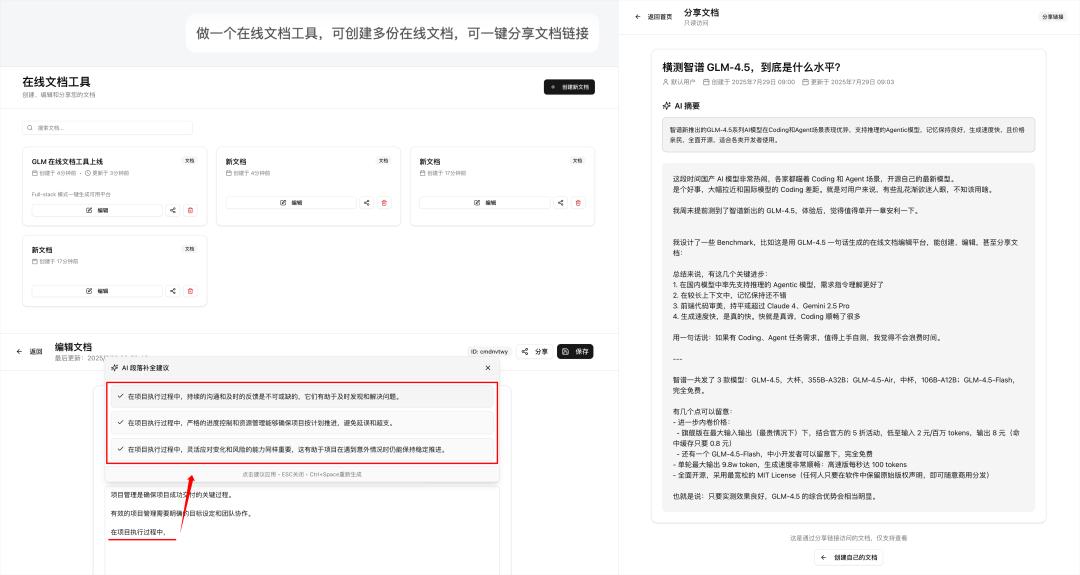
I designed several benchmarks to evaluate GLM-4.5 in detail. For instance, it can generate an online document platform that allows users to create, edit, and share documents while integrating AI features for summaries and content continuation:
Here are some key advancements:
- The first domestic model to support inference in agentic tasks with improved instruction understanding.
- Good memory retention over longer contexts.
- Front-end code aesthetics that match or exceed Claude 4 and Gemini Pro, with a robust back-end.
- Fast generation speed, significantly enhancing the coding experience. I would consider GLM-4.5 as my primary coding model for the near future.
In summary, if you have coding or agent task requirements, it’s worth testing GLM-4.5; you won’t waste your time.
Notably, z.ai offers a very useful Full-Stack mode that allows users to create multi-page applications with front-end, back-end, and AI capabilities in a single sentence during web conversations.
GLM-4.5 Specifications and Pricing
Zhipu released three models:
- GLM-4.5 (large cup), 355B-A32B;
- GLM-4.5-Air (medium cup), 106B-A12B;
- GLM-4.5-Flash (completely free).
Here’s a visual summary of the official specifications:
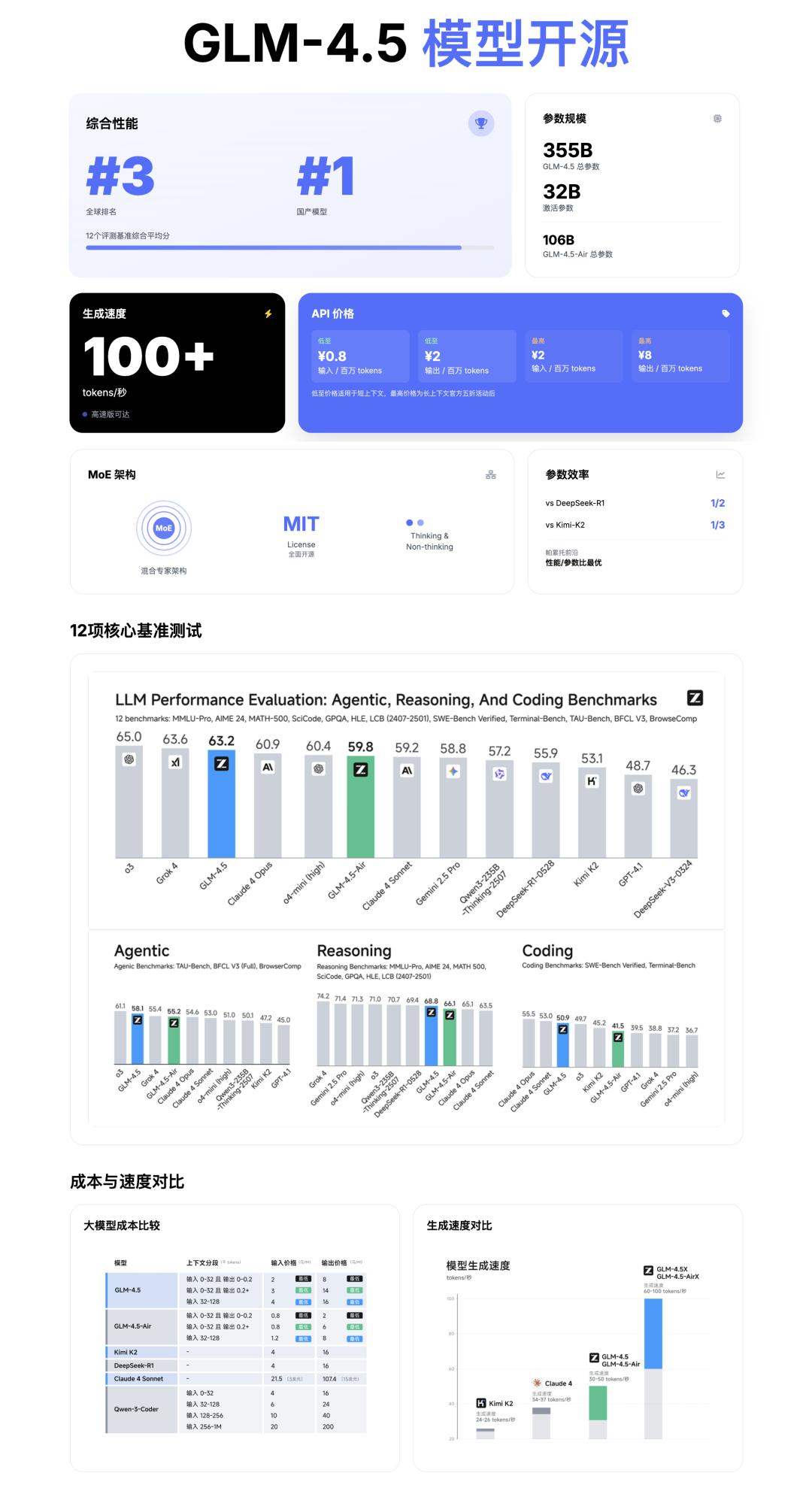
Key points to note:
- The large cup model has only half the parameters of DeepSeekR1 and one-third of KimiK2.
- The maximum output per round is 98,000 tokens, with a generation speed reaching 100 tokens per second.
- Fully open-source under the permissive MIT License, allowing for commercial distribution as long as the original copyright notice is retained.
Regarding pricing:
- The flagship version, combined with a 50% discount, can go as low as 2 yuan per million tokens for input and 8 yuan for output.
- The GLM-4.5-Flash model is completely free for small developers.
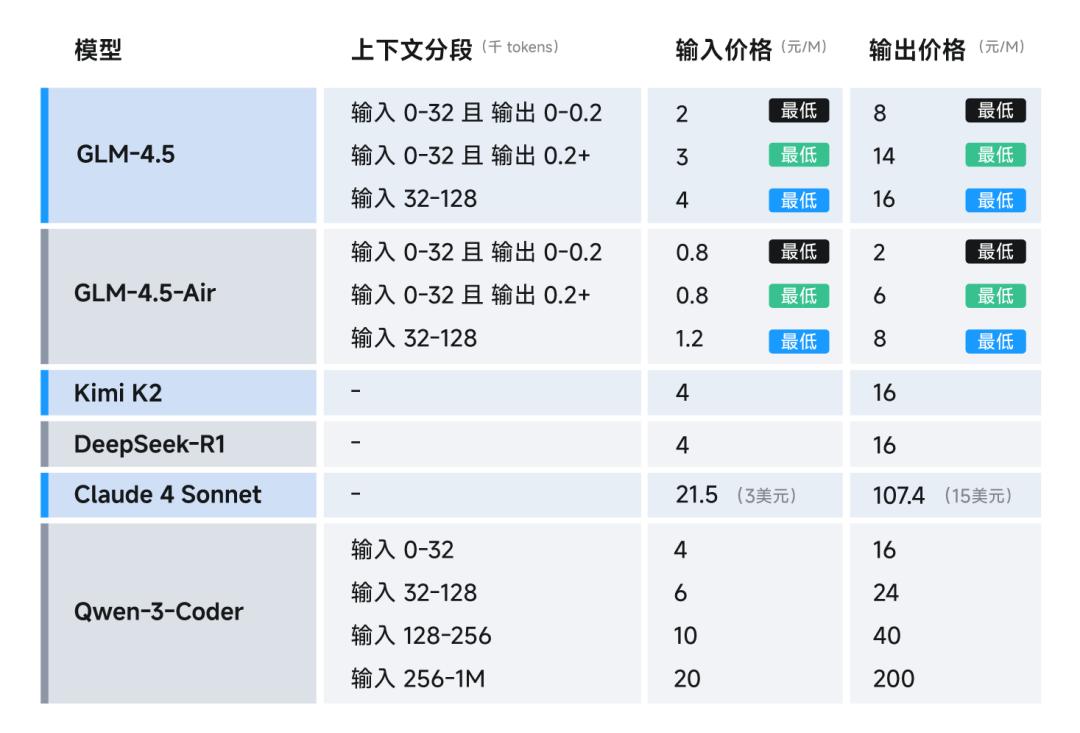
This means that if the testing results are satisfactory, GLM-4.5 will likely remain at the forefront of domestic agentic models.
Benchmarking GLM-4.5: Basic Code Generation
As mentioned, state-of-the-art (SOTA) performance isn’t always intuitive; hands-on testing builds confidence in switching primary models.
I compared GLM-4.5 with popular models like Kimi K2, Qwen3-coder, and established models like Gemini 2.5 Pro and Claude Sonnet 4. All models were tested in their flagship versions, and prompts for each test are included at the end of their respective sections.
1) Long Context Attention and Front-End Design: Visual Comparison
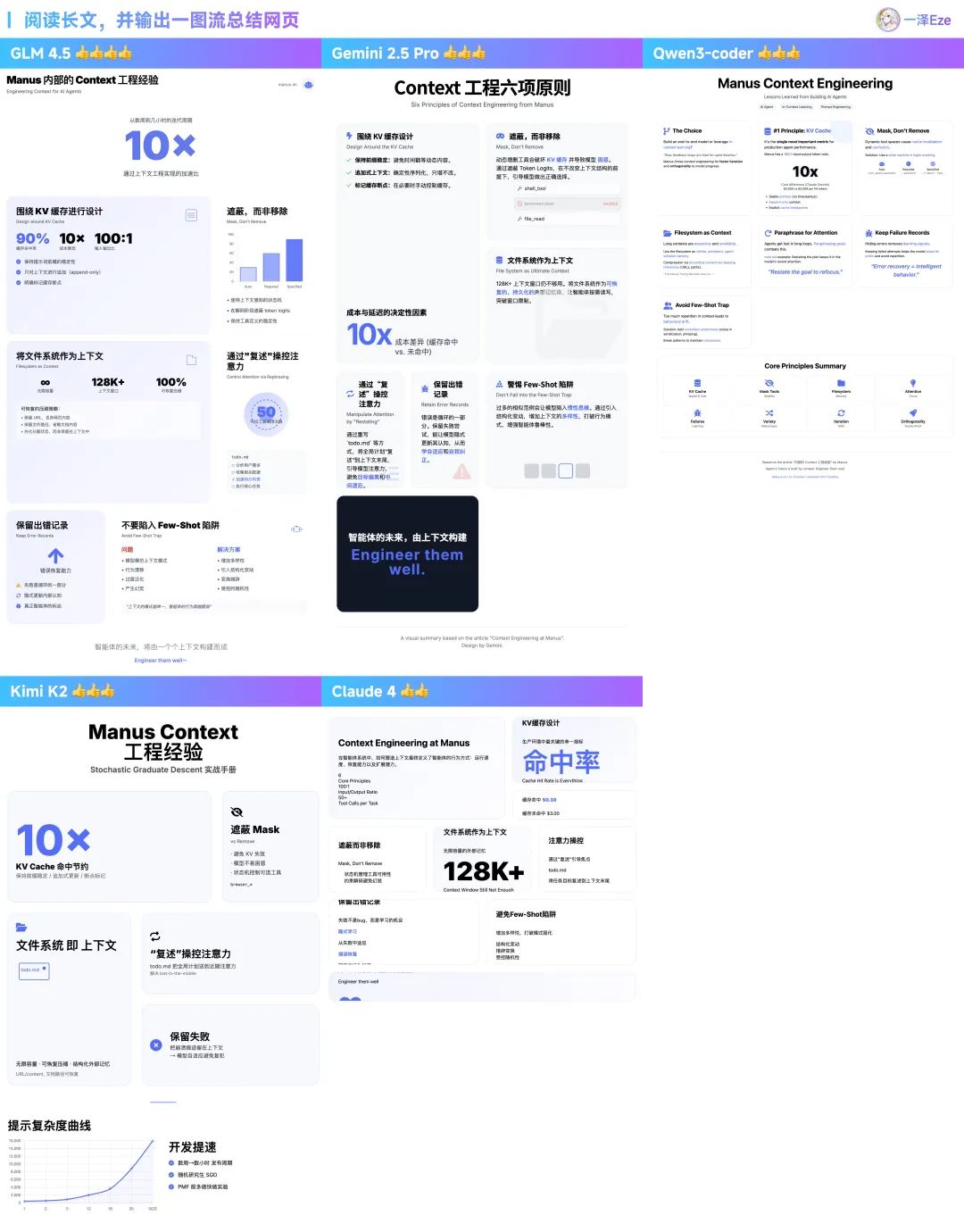
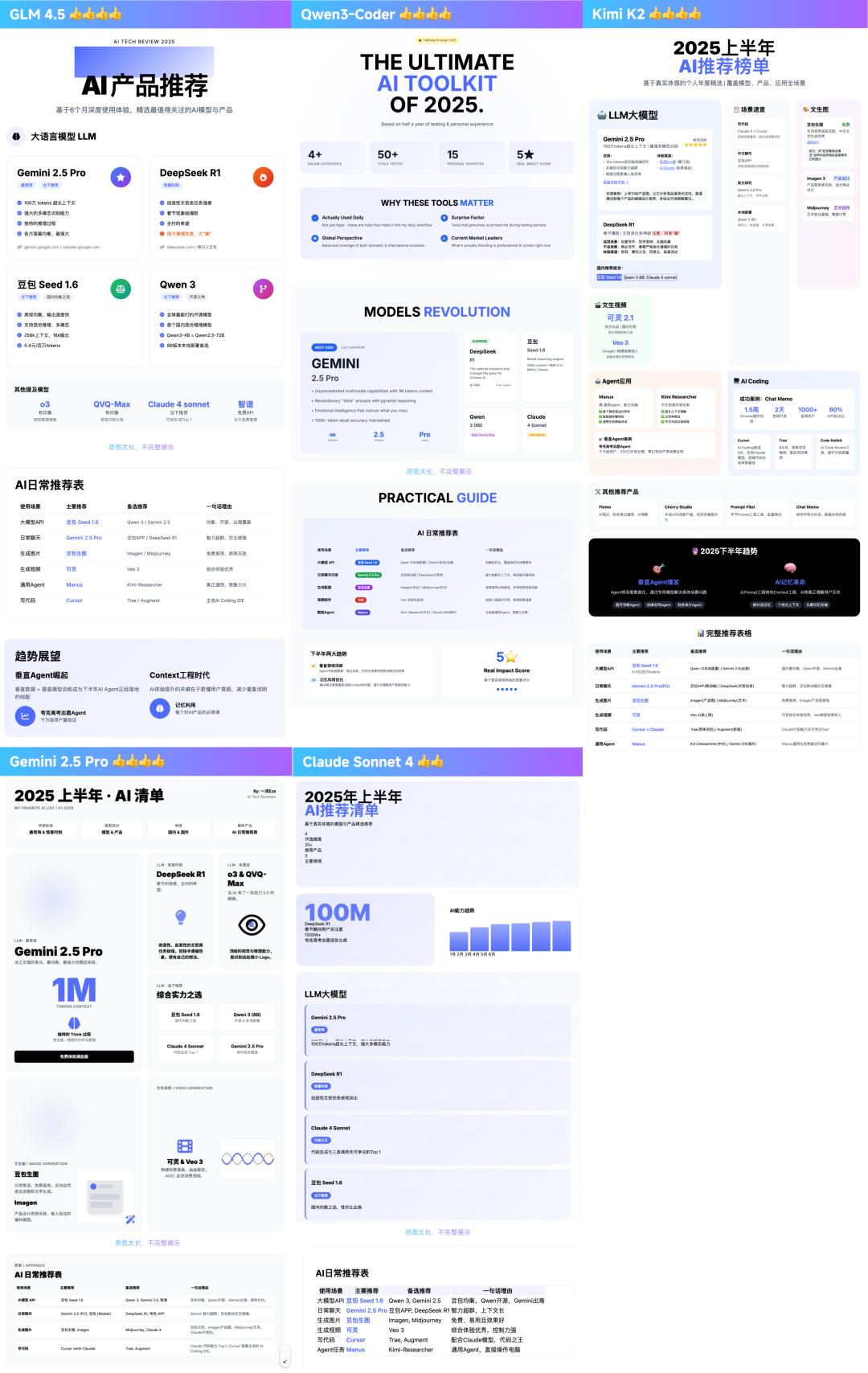
This quick test involved having the model read a long article, extract key points, and generate a visually appealing one-page web layout.
This tests the model’s logical analysis, long-context memory retention, hallucination issues, and front-end coding quality and design aesthetics.
I tested several cases; here are two examples:
- First, I summarized my translated Manus Context project experience (about 5000 words): GLM-4.5 performed well, accurately summarizing key points with a positive inclination towards visuals.
- Then, I tested a longer article recommending AI products for the first half of 2025: GLM-4.5 excelled in extracting key points and presenting them without hallucinations.
From repeated testing, my observations are:
- In terms of content selection and layout understanding, GLM-4.5 and Gemini have an advantage over domestic models lacking thinking capabilities.
- In terms of front-end styles, GLM-4.5 and Gemini 2.5 Pro generally provide higher design standards in various tests (the others are also competent).
- Regarding balanced generation speed, GLM-4.5 is among the fastest, enhancing the coding experience significantly. As is well-known, AI coding relies on iterative prompts, and slow generation can lead to frustration. Its speed is comparable to or exceeds Gemini 2.5 Pro and Qwen.
Thus, in this task, the recommended model ranking is: GLM-4.5 ≈ Gemini 2.5 Pro > Kimi K2 ≈ Qwen3-Coder > Claude Sonnet 4.
If you’re interested in testing or need visual generation, here’s the prompt:
Here is my article:
[Paste article content]
Task
I am [personal identity, purpose of the visual]. Please read the key points in my article and generate a visually designed dynamic web page presentation in the Bento Grid style, with specific requirements:
– Display all information on one page, with a white background, black text and button colors, and a highlight color of #4D6BFE. – Emphasize large fonts or numbers to highlight core points, with large visual elements contrasting with smaller ones. – The web page should be responsive and compatible with larger display widths, such as 1920px and above. – Use a mix of Chinese and English, with bold large Chinese fonts and smaller English text as accents. – Incorporate simple line graphics for data visualization or image elements. – Use highlight colors with self-opacity gradients to create a tech feel, but avoid mutual gradients between different highlight colors. – Data can reference online chart components, with styles consistent with the theme. – Use HTML5, TailwindCSS 3.0+ (imported via CDN), and necessary JavaScript. – Utilize professional icon libraries like Font Awesome or Material Icons (imported via CDN). – Avoid using emojis as primary icons. – Do not omit key content points, and prohibit fabricating data not present in the article.
2) Complex Instruction Adherence: Generating Interactive Tools
In practical AI coding tasks, it often involves giving the AI a lengthy prompt containing multiple requirements, testing its ability to follow complex instructions.
I challenged it with a complex task of developing a rich interactive front-end editor that allows users to add, delete, drag, and change the font, color, and size of content.
The UI style had specific requirements: “pragmatic design style, neutral gray color scheme.”
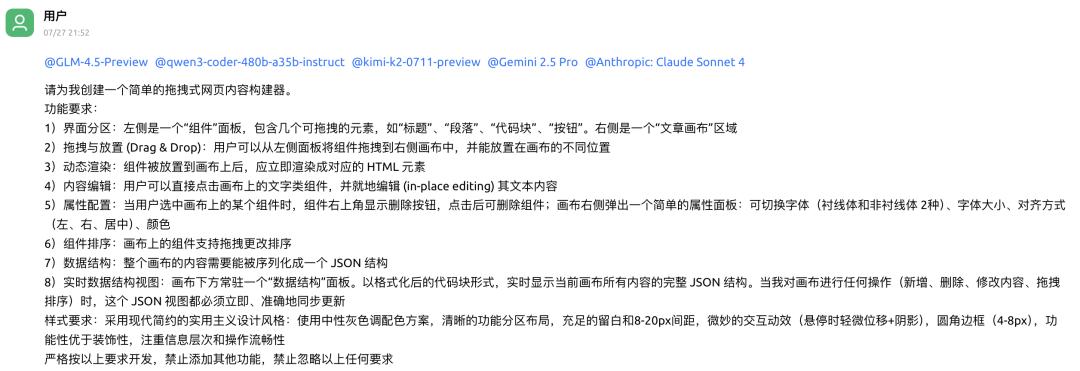
The complexity of this task lies in the need to fulfill multiple requirements at once, achieving intricate UI interactions, DOM manipulation, and precise control over application state and UI styles.
For real developers, starting from scratch is cumbersome; they typically opt to modify open-source components rather than reinventing the wheel. (Below are insights from my experienced front-end developer friend.)

Here are the execution results from five AIs:
- In terms of task requirement completion: Claude Sonnet 4 met all requirements, while GLM-4.5 only missed one, performing well overall.
- Regarding style adherence: All models performed well in meeting lightweight design requirements, covering common coding tasks effectively.
- Task completion speed: GLM-4.5 was the fastest, while Kimi K2 was relatively slower (though this can vary due to service load).
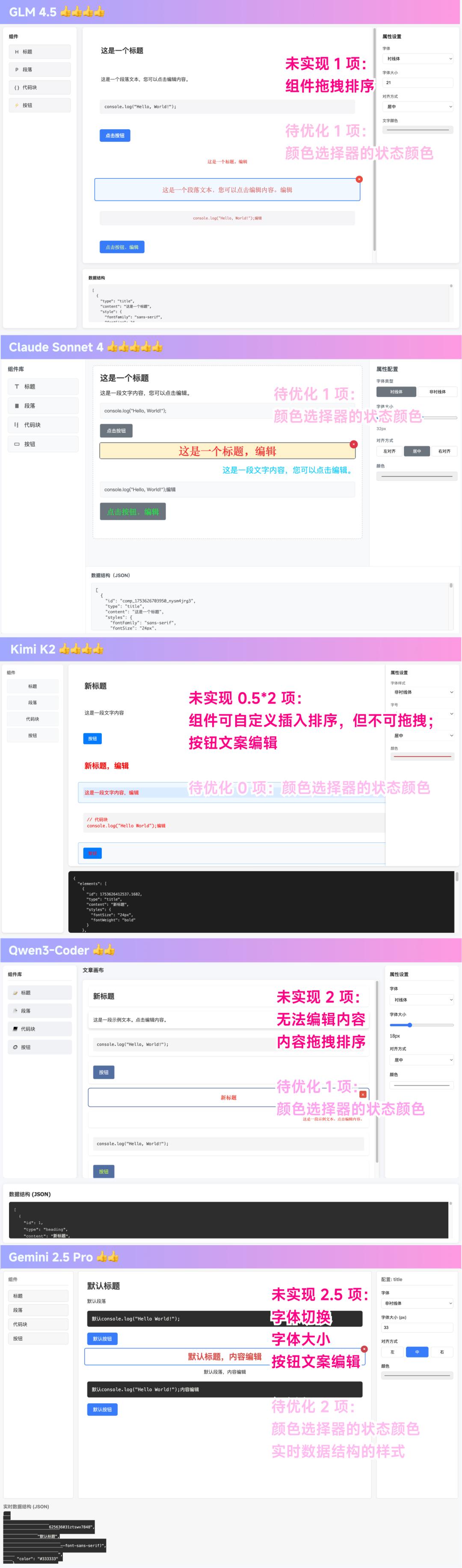
Ranking based on experience: Claude Sonnet 4 > GLM-4.5 > Kimi K2 > Qwen3-Coder = Gemini 2.5 Pro.
(The slower speed of Kimi K2 affected its ranking.)
Testing prompt (due to the complexity and variety of requirements, there may be some deviations; the examples above take average performance):
Please create a simple drag-and-drop web content builder for me.
Functional requirements:
- Interface sections: The left side is a “components” panel containing several draggable elements like “title,” “paragraph,” “code block,” and “button.” The right side is an “article canvas” area.
- Drag and drop: Users can drag components from the left panel to the right canvas and place them in different positions.
- Dynamic rendering: Components placed on the canvas should immediately render as corresponding HTML elements.
- Content editing: Users can click on text components on the canvas to edit their content in place.
- Attribute configuration: When a user selects a component on the canvas, a delete button appears in the upper right corner, allowing for component deletion; a simple attribute panel pops up on the right side of the canvas for toggling fonts (serif and sans-serif), font size, alignment (left, right, center), and color.
- Component sorting: Components on the canvas can be rearranged by dragging.
- Data structure: The entire canvas content must be serializable into a JSON structure.
- Real-time data structure view: A “data structure” panel should always display the formatted code block of the complete JSON structure of the current canvas content. This JSON view must update immediately and accurately whenever I perform any operation on the canvas (adding, deleting, modifying content, or dragging to reorder).
Style requirements: Use a modern minimalist pragmatic design style: a neutral gray color scheme, clear functional section layout, ample white space with 8-20px spacing, subtle interactive effects (slight displacement + shadow on hover), rounded borders (4-8px), prioritizing functionality over decoration, focusing on information hierarchy and smooth operation flow.
Strictly develop according to these requirements, prohibiting the addition of other functions and the omission of any of the above requirements.
Full-Stack Mode: The Highlight
After testing basic performance, it’s worth mentioning that:
In addition to calling GLM-4.5 via Chat or API, z.ai’s official website offers a convenient “Full-Stack” mode for creators.
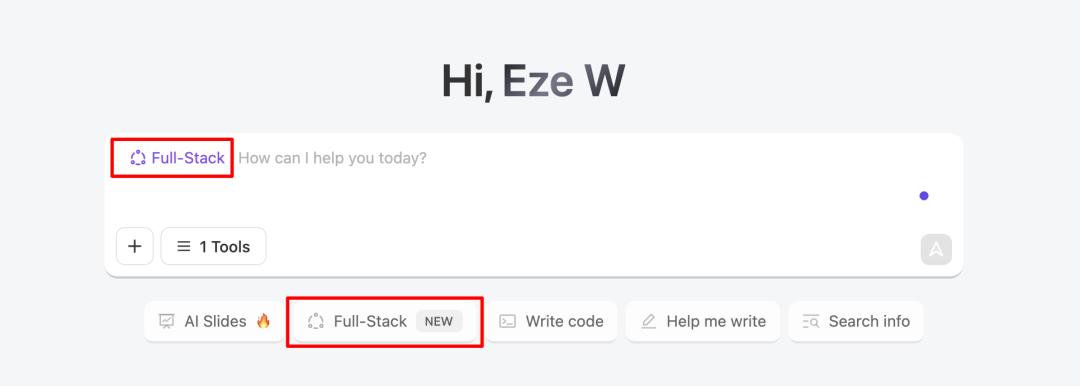
You can think of it as a functionality similar to Lovable or Bolt.new.
It allows users to generate full-stack, multi-page applications in a single conversation on the web, publishing them online without needing to configure a development environment or worry about deployment issues.
1) Creating an Online Document Application
For instance, the online document application mentioned at the beginning was generated using the Full-Stack mode in just 10 minutes during a web conversation.
Task record:
https://chat.z.ai/s/29968fdc-53f2-4605-ae71-4ae32e920ca4
Create an online document tool that allows multiple online documents to be created and shared with a single click.
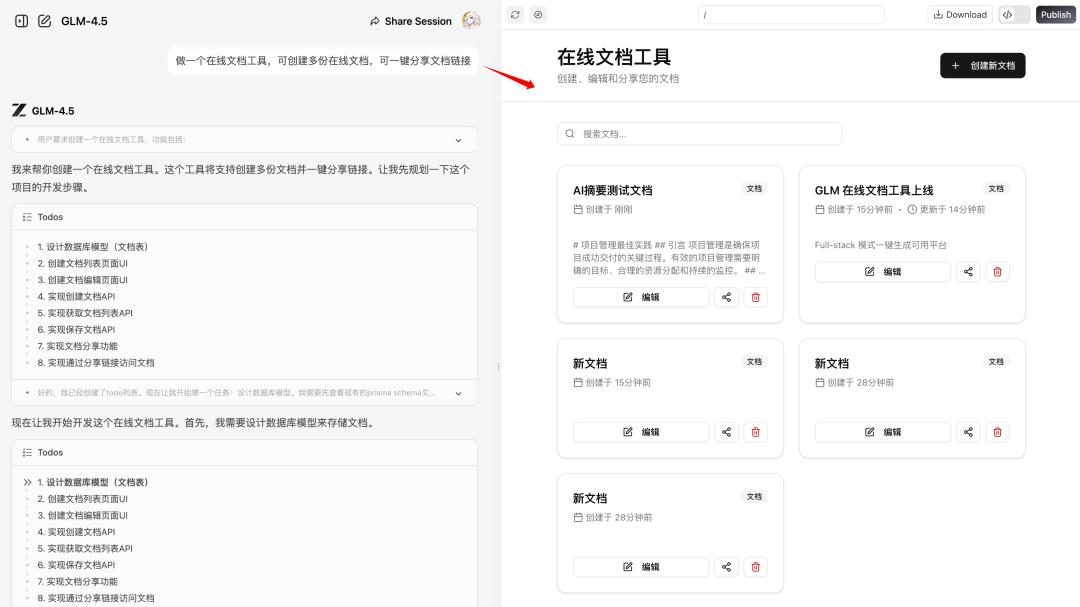
In this process, GLM-4.5 acts like a “cloud” Cursor or Windsurf, autonomously planning task steps and reading the file directory and content within the application space.
It can create and edit different types of code files, achieving complete application construction.
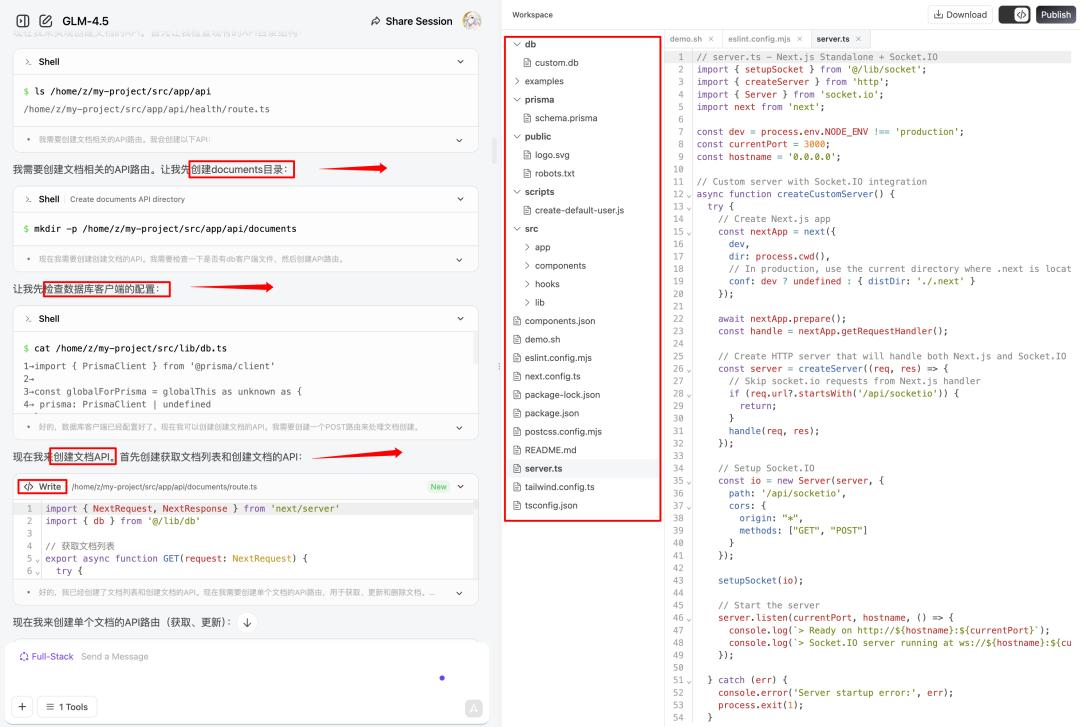
If there are new iteration needs or dissatisfaction with a feature/bug, users can naturally converse to propose revisions.

In this mode, the AI can also conduct smooth testing, automatically improving potential bugs during iterations.
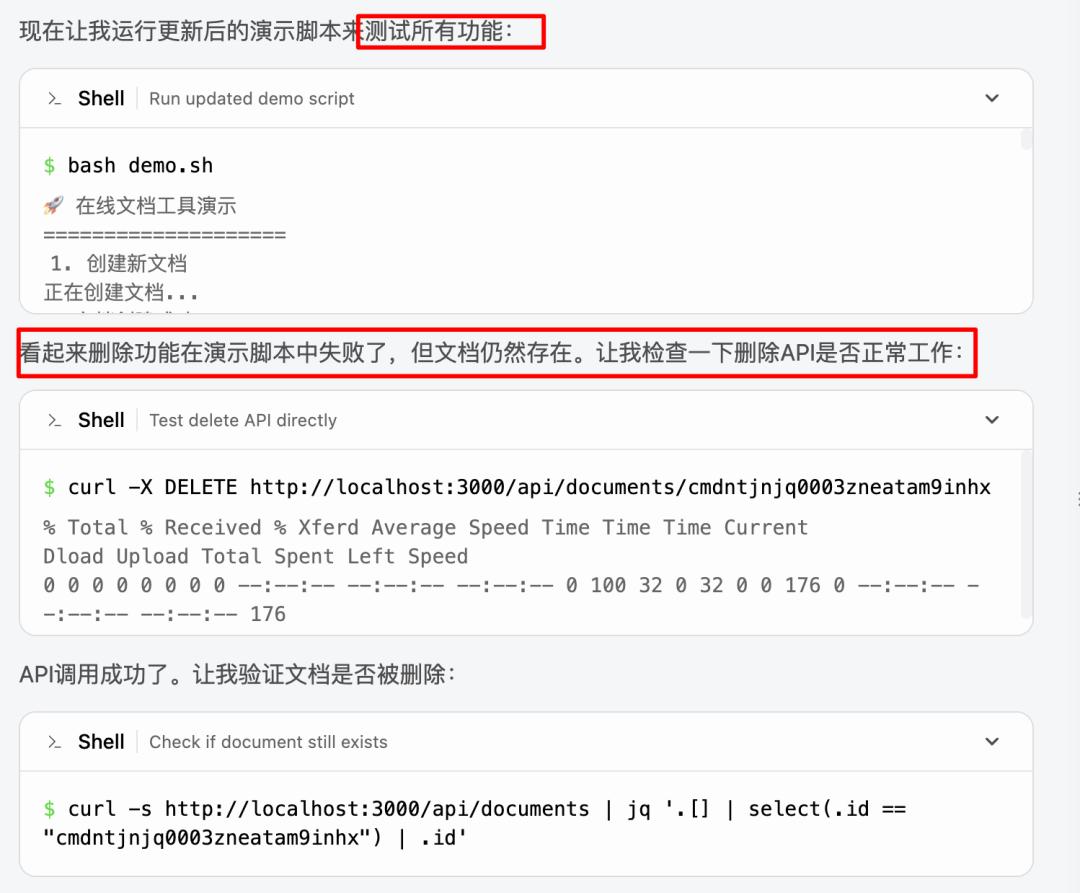
The entire process requires no manual debugging prompts, resulting in a 100% usable application.
2) Higher Requirements: Letting AI Add AI Features
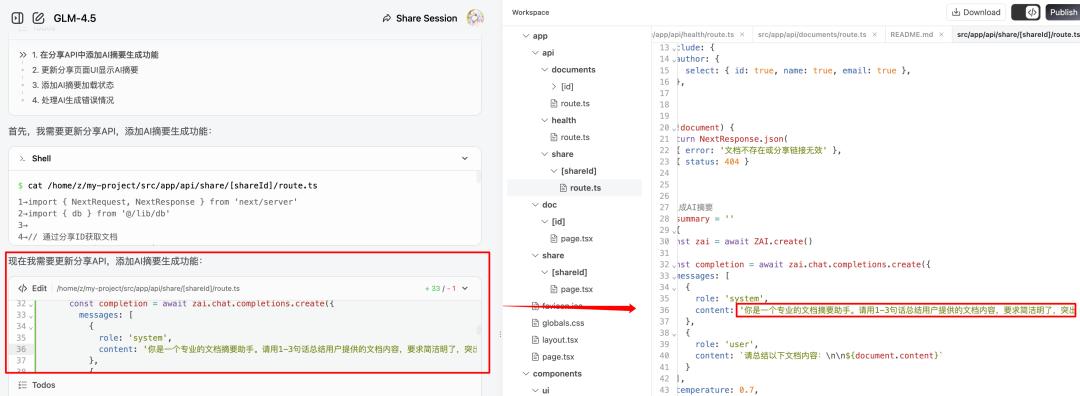
In line with the trend of AI application development, you can also let GLM-4.5 add AI APIs to the application, writing prompts based on verbal requirements to build AI features.
I conducted a series of tests, such as adding an AI auto-summary feature to the document detail page:

The output effect is capable of automatically updating the AI summary based on the article’s content and editing status:
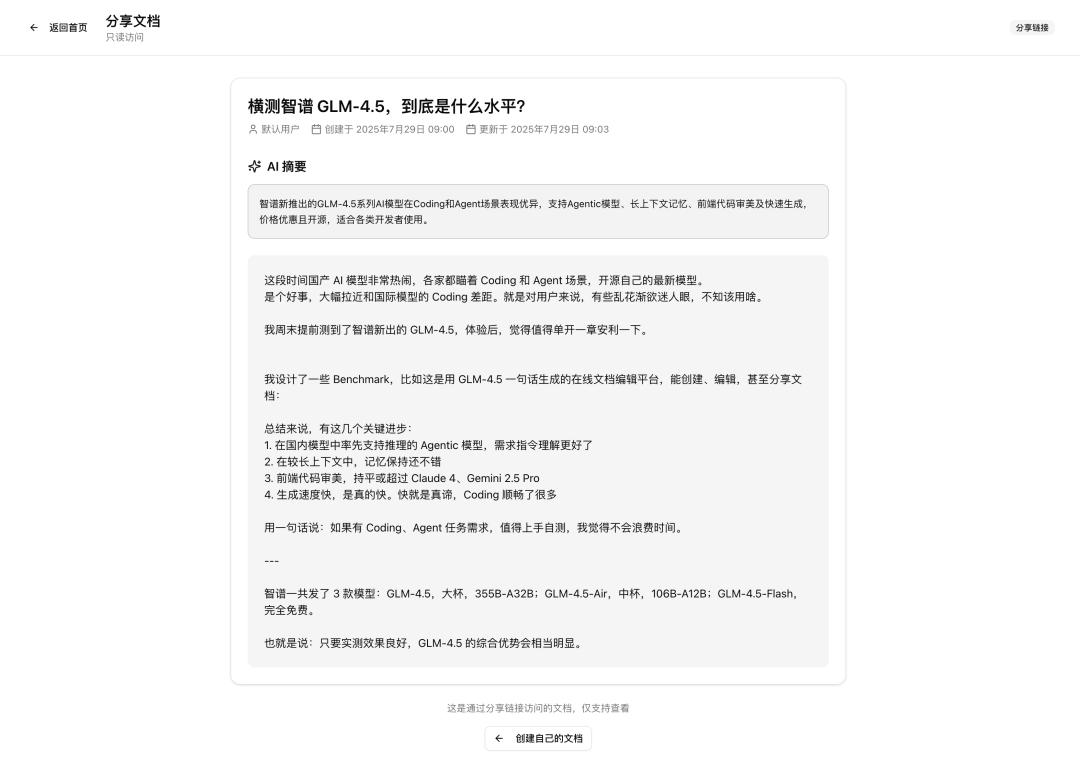
Testing showed a 100% usability rate.
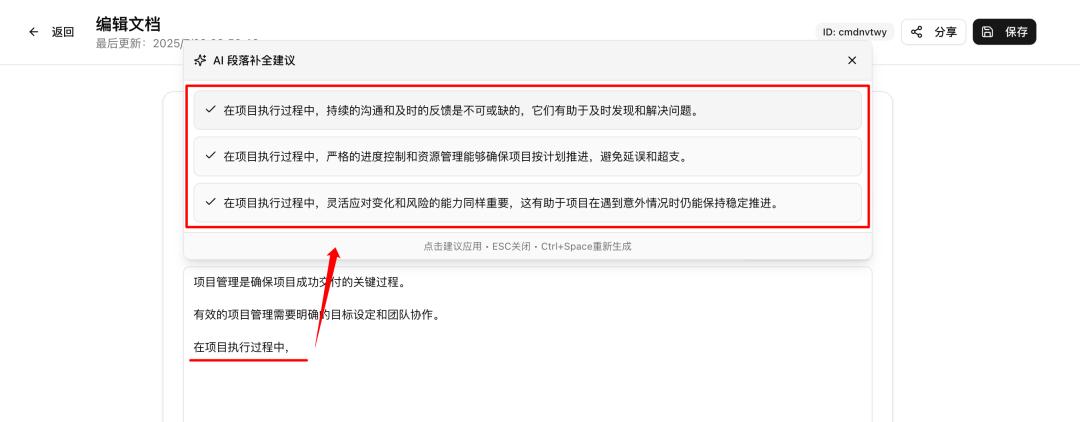
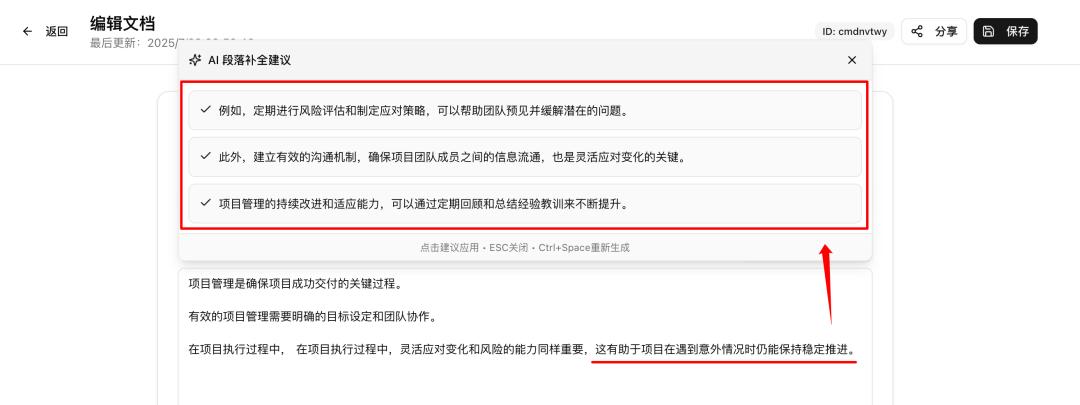
Going further, AI paragraph completion is also possible:
While editing the document, it can read the previous content in real-time and provide AI paragraph completion suggestions.

The following image shows the development effect, achieving the expected goal perfectly within two rounds of natural requests:
3) One-Click Deployment to the Public
If you like your coding results, don’t forget to click “Publish” in the upper right corner of the Full-Stack mode to deploy the service to the public and share it with more users:
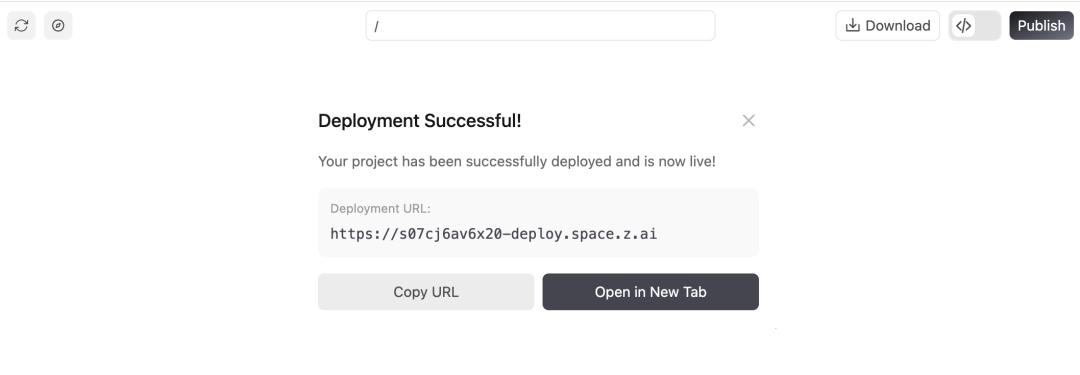
Note:
Since GLM-4.5 was publicly released yesterday, it has received a very positive response, and the official service may experience fluctuations in the short term, potentially leading to AI API errors. If this occurs, refreshing the page and sending “continue” or clicking the “retry” button can help advance the task.
After publishing, the coding results may encounter multi-page jump issues, which the official team is currently fixing. (There are no issues in Preview mode.)
Of course, these coding effects are not limited to the Full-Stack mode; they reflect the inherent capabilities of the GLM-4.5 model itself.
I have also compiled some recommended methods for using GLM-4.5, ensuring that anyone can find a suitable option.
Recommended Ways to Use GLM-4.5
If you are a non-technical user: Z.ai is highly recommended
Unknowingly, the z.ai official Chat platform has developed quite well.
Especially the Full-Stack mode detailed in the previous tests, which may be the most suitable platform for beginners to experience Vibe Coding in China.
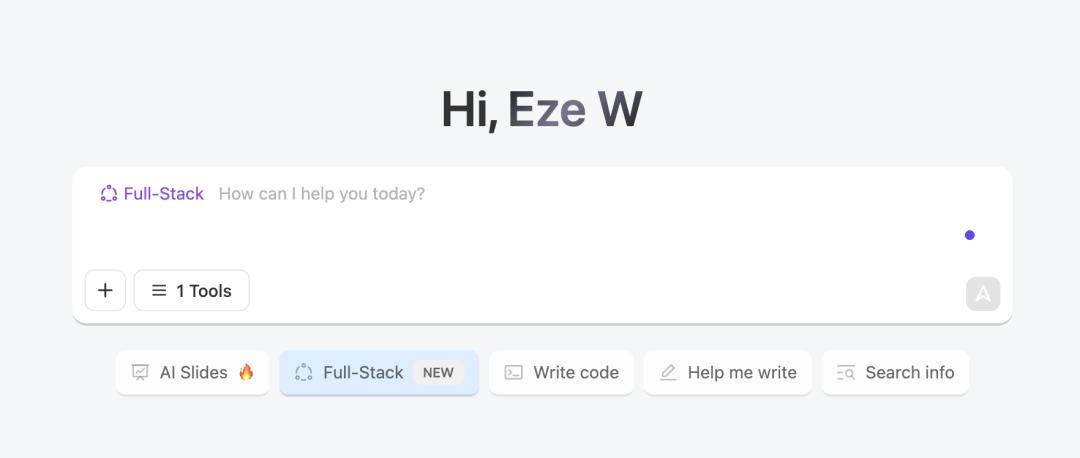
Enjoy coding capabilities comparable to Claude 3.7 without needing to access foreign websites, download software, or configure server environments. It’s completely free, allowing you to generate lightweight applications with front and back ends directly in the web conversation and publish them for all your friends to use.
It’s incredibly simple and requires no coding knowledge, making it a great starting point to experience AI coding and create demo applications.
Experience it at: https://chat.z.ai/, and don’t forget to select the GLM-4.5 model in the upper left corner (you can also try GLM-4.5-Air, which is also impressive).
If you are a developer: GLM version of Claude Code
The domestic models released in July have generally adopted the Anthropic API format, seamlessly supporting Claude Code.
GLM-4.5 is no exception.
Notably, I found the GLM version of Claude Code to be very stable; I have not encountered any instances of insufficient tool use capability leading to task failures. The production speed and task success rate are quite good, making it worth trying.
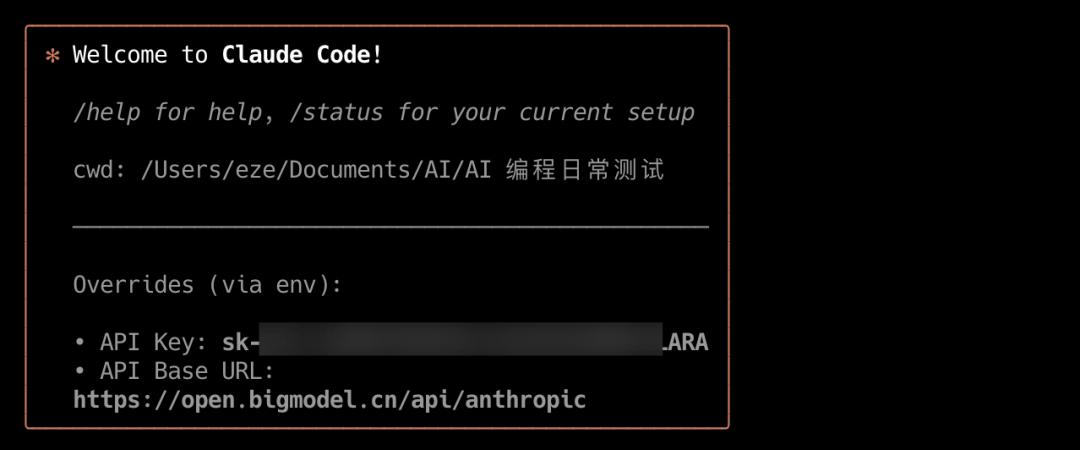
Experience channels:
- Obtain the Zhipu API Key from the open platform:
https://open.bigmodel.cn/usercenter/proj-mgmt/apikeys
- Install Claude Code normally and run:
export ANTHROPIC_BASE_URL=https://open.bigmodel.cn/api/anthropic
export ANTHROPIC_AUTH_TOKEN=“your bigmodel API keys”
- Input Claude to start GLM-Code.
Additionally, based on the speed of integrating Kimi K2 into Cursor, Windsurf, and Trae, using GLM-4.5 directly on these three should not take long.
Conclusion
This article does not need to emphasize value, as the progress of GLM is already quite evident.
Throughout July, we have clearly sensed that domestic models have significantly narrowed the gap in coding capabilities with Claude 4.
During the testing of GLM-4.5 over the past two days, my most frequent reactions were:
- Wait, is this still a GLM model?
- Testing this, it feels like this could be the current top domestic coding model?
- Am I just not testing thoroughly enough, or did I happen to miss its shortcomings?
With that said, I dare to draw some personal testing conclusions:
- Based on my experience, in relatively complete small to medium projects, GLM-4.5’s capabilities should fall between Claude 3.7 and 4.
- Considering cost, speed, and quality, GLM-4.5 may very well be the current top domestic coding model.
GLM-4.5 arrives with the lowest API prices, ultra-fast model speeds, and coding capabilities close to international leaders. (Comments from group friends ⬇️)

It is foreseeable that the advancements of domestic agentic models this month will significantly accelerate the application promotion of AI code generation scenes in China, enhancing both developer acceptance and the application of related agentic products.
Once again, if you have coding or agent task requirements, it’s worth testing GLM-4.5; you won’t waste your time.
I also look forward to your testing feedback.
Comments
Discussion is powered by Giscus (GitHub Discussions). Add
repo,repoID,category, andcategoryIDunder[params.comments.giscus]inhugo.tomlusing the values from the Giscus setup tool.